
Why shop with us
Brand: Hypertech
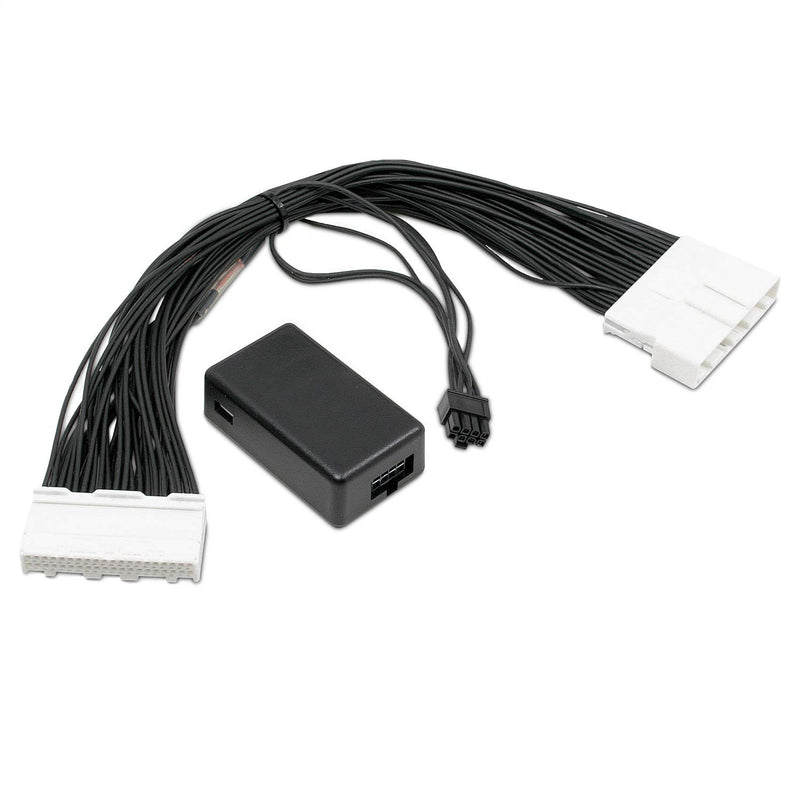
In-Line Hypertech 730130 Speedometer Calibrator
Hypertech 730130 calibrates speedometer readings for tire size and gear ratio changes.
Currently out of stock
No hidden fees — taxes included in the price & Free Shipping.
We accept major cards and digital wallets. Additional installment plans, when available, are offered by Shopify at checkout based on order eligibility.
In-Line Hypertech 730130 Speedometer Calibrator

When installing tires that are larger or smaller than original equipment tires, and/or a ring and pinion gear set with a different rear gear ratio, the Speedometer Calibrator allows you to correct speedometer readings.
The vehicle’s computer calculates speed based on the diameter of the stock tires.
If taller or shorter tires have been installed, or the rear gear ratio has changed, the vehicle’s computer doesn’t know how fast the vehicle is going.
As a result, speedometer readings will not be accurate as required by law.
Using the USB cable, connect the In-line Speedometer Calibrator Module to your PC and enter the new tire height and/or rear gear ratio.
Next, disconnect the factory connector to the instrument cluster behind the dash, snap in the Speedometer Calibrator Module, reconnect the cluster, and you’re done.
In a matter of minutes, you can correct your speedometer readings accurately.
Key Features
Specifications
- Length
- 8.0 lb
- Width
- 8.0 lb
- Height
- 1.75 lb
- Weight
- 0.42 lb
- ASIN
- B07R6BC44B
- UPC
- 759609051608
- Ships From
- United States
- Brand
- Hypertech
Frequently Asked Questions
About In-Line Hypertech 730130 Speedometer Calibrator
01 What does the Hypertech 730130 Speedometer Calibrator do?
The Hypertech 730130 calibrates speedometer readings for tire size and gear ratio changes.
02 How does the Speedometer Calibrator connect to a PC?
Using the USB cable, connect the In-line Speedometer Calibrator Module to your PC.
03 What is required for installation of the Speedometer Calibrator?
Installation requires disconnecting the factory connector to the instrument cluster and snapping in the Speedometer Calibrator Module.
04 What is the ASIN for this product?
The ASIN for this product is B07R6BC44B.
05 What is the UPC / barcode for this product?
The UPC/barcode for this product is 759609051608.
06 Where does this ship from?
Orders ship from our fulfillment center in Dover, Delaware, USA.
07 How many days will it take to arrive?
Orders ship within 1-2 business days and typically arrive within 4-5 business days via free standard shipping -- usually by Aug 28.
08 Does this product accept returns?
Yes -- this item can be returned within 15 days of delivery for a free return by mail. See our return policy for full details.

Special Offer
In-Line Hypertech 730130 Speedometer Calibrator
Get 5% off this item today — code TRY5 at checkout.
$225.48
View Product